// Plan Review for Civil Engineering

Weeks of Plan Review,
Fast-Tracked.

QualRivu brings plan review for municipalities and civil engineering firms across Canada, with the discipline high-consequence work demands. The AI reads the drawings. Deterministic code computes and cites. Your licensed engineer or designated reviewer holds every determination.

A 40-sheet set is flagged in less than 10 minutes.

Next: product
Design Submission Review Scanning
Roadworks & Drainage Standards PASS
Traffic Signals & Lighting Standards PASS
Watermain & Sewer Standards PASS
Construction Material Standards PASS

// Product

The whole review, not just the AI pass.

The AI pass is one step. Standards intake, workflow management, deterministic verification, collaboration and export are the rest - all in the browser.

Measured, Not Guessed

The AI only extracts: lengths, counts, spacing, clearance and verdicts are computed in code, and citations resolve to a verified section.

Your Standards, Encoded

The AI turns manuals, bylaws, and specs into structured, reusable audit rules: a living library of your jurisdiction's requirements.

Cross-Sheet Consistency

Cross-references resolve across the submission, and structures and pipe runs shown on multiple sheets are reconciled; mismatches surface as findings, not surprises.

Compliance Checks

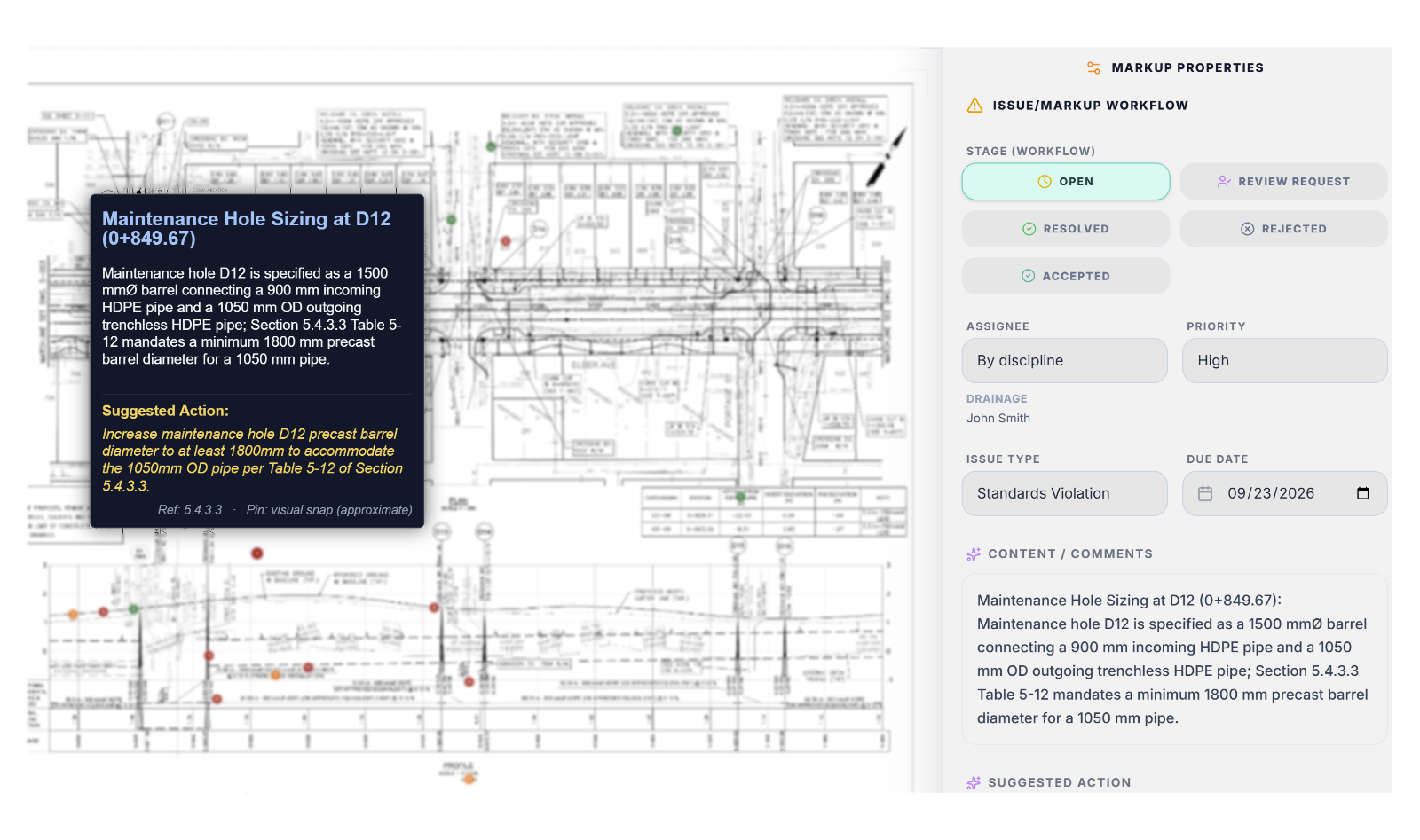
QualRivu flags deviations from bylaws and standards and places spatial markups on your drawings, with every finding engineer-verified before sign-off.

Snap-to-Vector Measurement

A high-performance canvas renders full-resolution sheets at any zoom, with measurement tools that snap to the drawing's CAD vectors - real linework, not a pixel estimate.

Workflow

Create teams with defined roles, assign drawings, track review status in one submission-to-decision pipeline; live dashboards roll up progress. A traceable record holds every verified review action.

Real-Time Collaboration

Work the same drawing with live cursors or on your own; add markups and submit comments for review. Built for iPads and tablets. Lose your connection with a sheet open and your markups queue on the device, then sync when you reconnect.

AI Chat

Ask the AI about anything on the drawing; answers cite the exact standards section. Where a sheet cross-references detail sheets, the AI reads those, so the answer carries the full design context.

Canadian Data Residency

Drawings, audit records and project data stay in Canada (Azure Canada Central), application and database in the same region. Zero AI training, data encrypted in transit and at rest. Built for FIPPA and PIPEDA, SOC 2 on the roadmap. On a dedicated deployment, storage and database run on your servers or cloud account.

Next: how it works

// How It Works

The Workflow

From defining your standards to exporting results: four steps that replace weeks of manual back-and-forth.

1

Define Standards

The AI transforms engineering manuals into structured audit rules, building a digital library of your jurisdiction's unique requirements.

2

Intelligent Analysis

Upload the set. QualRivu reads what is printed, measures what is drawn, computes each verdict in code, and places a markup at the station where it applies, with the clause it checked and the action the standard requires.

3

Collaborative Review

Your team works the same drawing, together or on their own time. Live sessions share cursors, so you can point at what you mean. Verify flagged findings with measurement tools, accept, reject or discuss each one, then clear the Design Checklist to catch what the AI missed. The reviewer holds every determination.

4

Export & Release

Export drawings with markups to PDF, readable as real comments in Acrobat or any PDF reader, alongside a memorandum and design data tables linking every finding to its drawing. Release the review to the submitter as Revisions Required, Approved or Rejected - markups land on their drawings, and the record is read-only.

Next: why it holds up

// Why it holds up

An AI model can read a drawing. It can't be trusted to do the math or cite the clause.

Pointing a capable AI model at a drawing produces a demo, not a review tool. What makes it one is everything built around the model. Two failure modes we engineered out, and what happens instead:

Plausible-but-wrong citations

What happens

A vertical curve is annotated K=4.1, and the AI model reports the finding against "section 4.1" (a sanitary sewer clause) because the number looks like one. Nothing looks wrong until someone opens the standard.

How it's handled

Every citation must resolve to a real section of the jurisdiction’s own standards before it is shown - and to the right discipline: a road finding cannot carry a sanitary clause.

A note is not a hydrant

What happens

A construction note - “REMOVE AND DISPOSE OF EX. HYDRANT” - mentions a hydrant, and the model counts one. Six mentions become six hydrants where the drawing shows two.

How it's handled

Counts are reconciled against the drawing's own CAD layers, where each hydrant has an exact position - prose can confirm attributes but never invent a feature. Sheets without those layers say their counts are model-only.

Two more, in the same shape

The reference package that was wrong for the sheet

What happens

A pavement resurfacing sheet is sent the watermain, storm and sanitary detail sheets on every model call - details for trenches it does not cut. Beyond their cost, irrelevant references invite irrelevant findings.

How it's handled

Which reference sheets accompany a drawing is decided by what that drawing actually does. A pavement-restoration sheet gets the utility details, because it repairs a trench; a resurfacing sheet does not.

The ambiguity that must not be resolved

What happens

A standards library states three minimum widths for a cycling facility - painted, one-way protected, two-way protected. A drawing naming none of them can be judged against any; choosing one is a coin-flip.

How it's handled

Where the drawing does not say which sub-type applies, the check uses the most lenient candidate limit, so it can only fail a design that fails under every reading - and the finding states that the requirement varies and names what the reviewer must confirm.

None of this was fixed by a better model. Each case is a decision the model does not get to make.

Next: who we are

// About

Built for the Canadian infrastructure landscape.

QualRivu was founded to fix one of the most persistent bottlenecks in Canadian infrastructure development: the design review process. What should take days routinely takes months, stalling projects and adding unnecessary cost to municipalities and developers alike.

We are building the review layer that sits between a submitted drawing set and a signed decision: the standards a jurisdiction actually enforces, the arithmetic that proves compliance, and the record of who decided what.

Headquartered in British Columbia, QualRivu Inc. is federally incorporated and built to serve municipalities and civil engineering firms from coast to coast.

Federally incorporated - Corporations Canada
Canadian data residency - drawings and records stored in Canada
PIPEDA-compliant architecture
SR&ED and NRC IRAP aligned R&D program

The Founding Team

AL

Alex

Co-Founder

GE

George

Co-Founder

DR

Dre

Co-Founder

Next: common questions

// FAQ

Common Questions

The questions municipalities and consultants ask first.

What is QualRivu?
QualRivu is a collaborative review platform for the municipal engineers who review submissions and the consulting engineers who make them. Developers see the result as fewer resubmissions and faster approvals. It checks engineering design sets against your local bylaws and standards, raising the quality of submissions while cutting review and permitting timelines.
How does the AI help in engineering reviews?
It acts as a second reviewer that never skips a sheet. The model reads what is printed: callouts, labels, levels. QualRivu measures what is drawn, so a callout is checked against the line it points to, and a profile's levels against the plan above them. Every finding names the sheet, the station and the clause.
Is the AI meant to replace my engineering judgment?
No, it augments it. QualRivu surfaces potential issues and extracts data, but every finding still requires professional verification and sign-off by a qualified engineer. The tool speeds the review; the licensed engineer stays in control.
What are the limitations of AI-assisted review, and how does QualRivu handle them?
An AI model reads what is drawn; it does not exercise engineering judgment. QualRivu is built around that. On critical checks the AI only transcribes the values printed on the sheet, and deterministic code does the arithmetic and issues the verdict - repeatable and testable. Every finding stays advisory until a reviewer accepts, rejects or discusses it, and clicking one lands at its exact location, where the measurement tools make verification seconds of work. The system separates "checked and passed" from "could not verify" and records where every value came from, so gaps stay visible. The Design Checklist then turns your jurisdiction's expected checks into a list the reviewer works through.
How secure is my project data?
Security and data residency are foundational. Your drawings, audit records and project data are stored in Canada (Azure Canada Central), with the application and database in the same region, encrypted in transit and at rest, and isolated per organization. Your drawings are never used to train AI models. Our Security page sets out exactly what sits where, along with our PIPEDA position and SOC 2 roadmap.
How can I connect my own jurisdiction's standards?
The Standards Generator ingests your local specifications, bylaws, and codes and extracts the rules into a structured, reusable library that every submission is then checked against: your jurisdiction's requirements, applied consistently.
What types of engineering drawings can the platform process?
CAD-exported vector PDFs: utility plan and profile sheets, site plans, roadworks, pavement reconstruction, street lighting, cross-sections, and more. From a 30% concept set to a final Issued-for-Construction package, QualRivu parses the layers and data bands. Certain drawings such as lift stations and detention tanks are reviewed at a high level rather than in detail.
What is the typical turnaround time for a complete drawing set audit?
A typical set of drawings (20 to 40 sheets) is scanned and flagged in about 5 to 10 minutes, so your team can move straight to reviewing findings.
Next: book a demo

// Contact

Ready to cut your review timelines?

Book a 30-minute demo to see QualRivu in action with your team's real workflow.

Book a Live Demo See a full workflow walkthrough with your team
Based in British Columbia Serving municipalities across Canada
hello@qualrivu.ai We respond within one business day